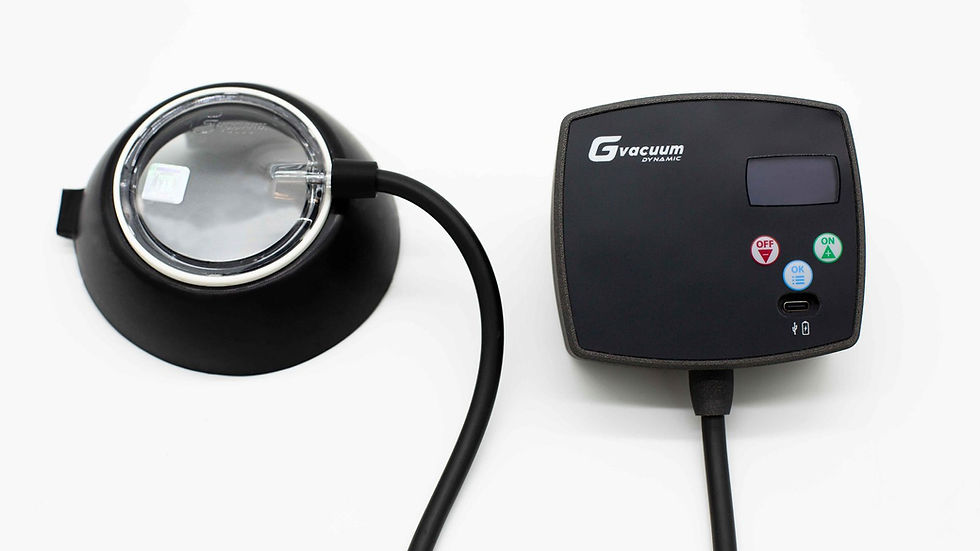
Gvacuum Dynamic Lite: Who Benefits from the Quick Start Feature?
Why Daily Consistency Is the Real Variable in Treatment
What really determines the outcome of vacuum bell treatment is not how complex the device is, but how consistently it is used every day. Haecker and Mayr's pressure-and-duration protocol describes regular application as the core principle of the therapy [1]. Kumar and colleagues' systematic review similarly emphasizes that treatment adherence (compliance) is the single most important variable in outcomes, regardless of device type [2]. The practical consequence: what usually makes treatment difficult is not the pressure itself, but the small steps required to repeat that plan every single day. The less time and attention a session takes to start, the less likely it is to be skipped or postponed - which can be an indirect factor supporting long-term consistency.
Three Ways to Run a Session on Gvacuum Dynamic Lite
Gvacuum Dynamic Lite's control unit has three buttons: plus, minus, and menu, and the menu lets you choose between three ways of running a session. In Manual mode, pressure is raised step by step through 10 pressure levels using the plus/minus buttons, and the device then holds that level. On the unit's menu this direct, no-schedule way of starting a session is also called Quick Start - the name we'll use throughout this article. In Preset mode, you select one of the built-in ready-made programs, which then runs on a 2-hour countdown. In Custom Set mode, you build your own pressure sequence (for example 40 mbar, up to 80, back down to 40, then up to 100) and that custom program also runs on a 2-hour countdown. This article focuses on Quick Start (Manual).
How Quick Start (Manual Mode) Works
With Quick Start, you raise the pressure step by step through the 10-level adjustment using the plus/minus buttons until you reach the level you want. Once there, the target-pressure maintenance mechanism holds that pressure steady for the rest of the session, so you don't need to keep checking or re-adjusting it. There is no time limit in this mode: the session simply continues until you press OFF. Unlike Preset and Custom Set, Quick Start isn't built around a pre-defined time-based schedule - it's the simplest way to run a session, built around a single target pressure.
What Step Does Quick Start Simplify
Quick Start removes the step of building a program or selecting a ready-made one from the menu. You only decide the mbar value you want to reach; the device takes care of getting there and staying there. Having no time limit is a separate convenience too - you aren't forced to fit the session into a pre-set duration, you decide how long it runs. This can be a practical convenience especially before heading out in the morning, at the end of a tiring evening, or while occupied with something else at home.
Who May Benefit Most
For people starting treatment for the first time, choosing one of the Preset programs or building a Custom Set sequence can feel like a lot to take in at the start; Quick Start's single-target focus can make the early learning period easier. For children and teenagers, reaching one target pressure with a single action and being able to stop whenever they want, with no time limit, can make the daily routine feel less tedious. For people with a busy work or school schedule, being able to start a session quickly can prevent treatment from being pushed to a different, less convenient time of day - which can help maintain consistency on busy weekdays.
What to Watch For When Setting Up Quick Start
The target pressure used in Quick Start should be set according to the clinician's recommendation during initial setup. Rather than trying a high target pressure on your own as soon as you receive the device, it's a better approach - for both comfort and safety - to start with the recommended value and update the target over time, again under clinical guidance. Watching the pressure reading on the screen during the first few sessions helps confirm the target is being reached and held as expected.
What Quick Start Does Not Do
Quick Start does not automate everything. The clinician still decides what target pressure is appropriate; the device only makes applying that decision easier. Quick Start also doesn't replace monitoring the skin or how the session is going - if discomfort is felt during a session, it should be stopped. One more limitation: the target pressure needs to be updated as needs change over time; the value set in Quick Start stays fixed until the clinician's recommendation changes.
Fitting Quick Start into a Daily Routine
Quick Start doesn't create a routine by itself - it makes an existing one easier. Once the target pressure is set according to the clinician's recommendation, all that's left is to place the session at the same time each day, decide how long to run it on a given day, and repeat it consistently. Some people prefer a session before breakfast, others in the evening while watching TV; which time and daily flow works best varies from person to person, and will be covered in more detail in a separate guide.
How Quick Start Differs From Preset and Custom Set
All three ways of running a session rely on the same target-pressure maintenance mechanism; what differs is how pressure changes over time. In Preset, pressure changes automatically over a 2-hour program according to a built-in schedule. In Custom Set, you design that changing sequence yourself, again within a 2-hour window. In Quick Start, there is a single target pressure, no time limit, and the pressure stays unchanged for the whole session. Which mode to use when is worth deciding together with a clinician.
Quick Start (Manual Mode) Is Not the Same as the Manual Vacuum Bell Model
It's worth not confusing the unit's 'Manual' mode with the separate Gvacuum manual vacuum bell product. With the hand-pump manual model, every session requires pumping the pressure up step by step; there is no way to reach a pre-set target with a single action, and there's no automatic target-pressure maintenance - if pressure drops, it needs to be pumped back up manually. Gvacuum Dynamic Lite's Quick Start (Manual) mode applies the same single-target idea electronically: once the pressure is reached, the device holds it on its own. Both models use the same vacuum bell treatment principle [1][2], and what determines the outcome, regardless of model, is daily consistency.
Frequently Asked Questions
Does Quick Start always run at the same pressure for every user?
No. Quick Start runs at the target pressure set by the user or recommended by the clinician; this value is personal and can be changed whenever needed.
What's the difference between Quick Start and Preset/Custom Set?
Preset means selecting one of the ready-made programs and running its pre-defined pressure changes over a 2-hour schedule. In Custom Set, you design that changing sequence yourself, again within a 2-hour window. Quick Start simply reaches a single target pressure with no time limit and keeps it unchanged. All three serve different needs.
Does using Quick Start affect session safety?
No. Quick Start only simplifies how the session is started; the pressure limits and the target-pressure maintenance mechanism work the same way regardless of mode.
Can the target pressure in Quick Start be changed later?
Yes. The target pressure can be updated through the menu whenever the clinician's recommendation changes or the need arises; the change only affects the next session.
Can Quick Start be used while traveling or away from home?
Yes. Quick Start works the same way wherever the device is used; being in a different place doesn't change the target pressure that's been set.
Closing Thoughts
Quick Start is not, by itself, a feature that changes the outcome of treatment - what determines the outcome, as the literature emphasizes, is how consistently the pressure plan is followed day after day [1][2]. But the simplicity of starting a session, and not being limited by a fixed duration, can be a practical detail that helps maintain that consistency, especially on busy days. It's worth consulting a specialist to evaluate which mode - Quick Start, Preset, or Custom Set - is right for you.
Sources
Contact Us
Have questions? Talk to our team about pectus treatment products and the right solution for you.